








You took out a loan. Now you want to know exactly where your money goes every month.
That’s what a loan repayment schedule shows you: how much of each payment covers interest, how much chips away at the balance, and when you’re finally done.
Here’s how to build one by hand, with real numbers, so you can check any loan against it.
What is a loan repayment schedule?
A loan repayment schedule (also called an amortization schedule) lists every payment over the life of a loan. Each row shows the payment number, the interest portion, the principal portion, and the remaining balance.
Banks generate these automatically. Freelancers, small lenders, and anyone comparing loan offers usually don’t have that luxury. So you calculate it yourself.
What you need before you start
Four numbers, and that’s it:
- Loan amount (the principal)
- Annual interest rate
- Loan term (in months)
- Payment frequency (almost always monthly)
Let’s work through a real example: a $20,000 personal loan at 9% annual interest, paid monthly over 5 years (60 payments).
How to calculate a loan repayment schedule (step by step)
Step 1: Convert the annual rate to a monthly rate
Divide by 12.
9% ÷ 12 = 0.75% monthly, or 0.0075 as a decimal.
Step 2: Calculate the fixed monthly payment
Use the standard loan payment formula:
M = P × [r(1+r)^n] / [(1+r)^n − 1]
Where P is the principal, r is the monthly rate, and n is the number of payments.
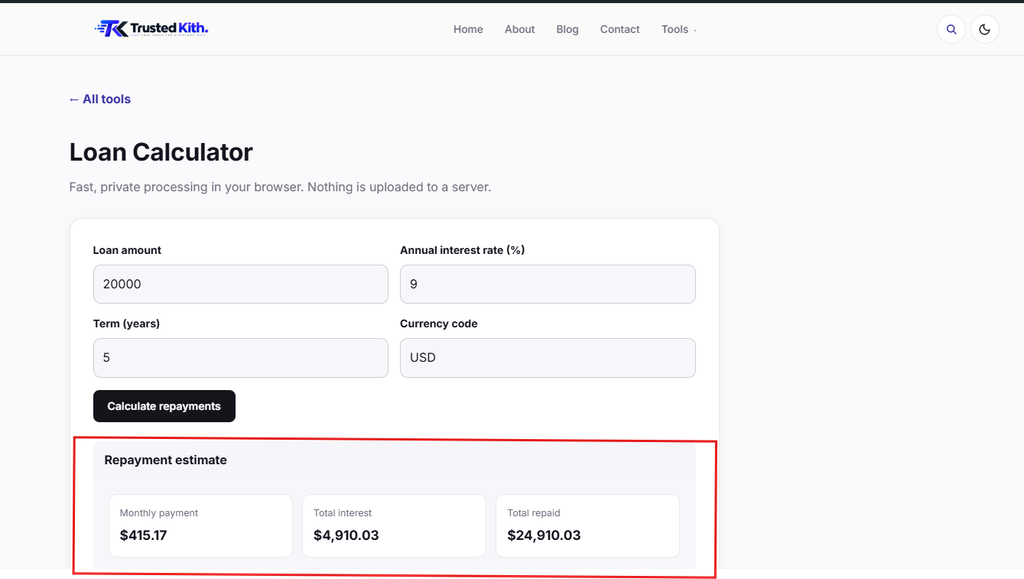
Plug in $20,000, 0.0075, and 60, and you get a monthly payment of $415.17.
Step 3: Split the first payment into interest and principal
Interest for month 1:
$20,000 × 0.0075 = $150.00
Principal for month 1:
$415.17 − $150.00 = $265.17
Your new balance is $20,000 minus $265.17, or $19,734.83.
Step 4: Repeat for every remaining month
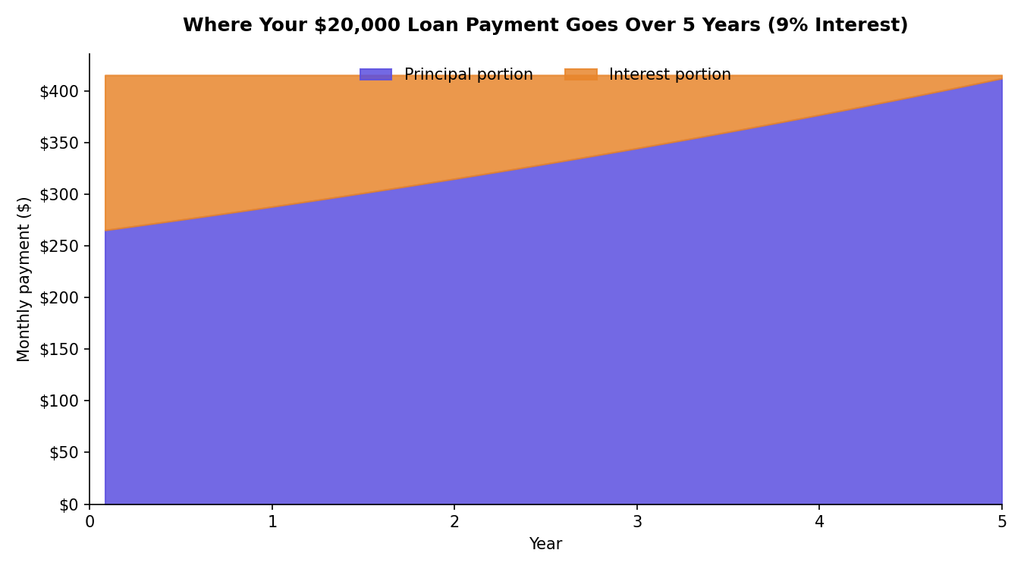
Next month, calculate interest on $19,734.83 instead of the original $20,000. The interest portion shrinks a little each time. The principal portion grows to match. That’s the whole mechanic behind a loan repayment schedule: the split changes every single month.
Do this 60 times and the balance hits zero. Over the full 5 years, you’ll pay $24,910.03 total, meaning $4,910.03 of that is interest.
Step 5: Build the full table (or let a tool do it)
Sixty rows of subtraction by hand is asking for a mistake somewhere around month 40. This is exactly what our loan calculator is built for: enter the loan amount, rate, and term, and it generates the complete month-by-month schedule instantly in your browser.
Financing real estate instead of a personal loan? Our mortgage calculator runs the same math with mortgage-specific inputs like property price and deposit.
Simple interest vs. amortized schedules
Not every loan works the way the example above does. Two structures show up most often:
Amortized. Fixed monthly payment, interest calculated on the shrinking balance. Most personal loans, auto loans, and mortgages use this.
Simple interest. Interest accrues on the original principal (or the current balance, depending on the lender) without compounding into the payment structure the same way. Pay it off early and you save more, since you’re not locked into a fixed schedule.
Check your loan agreement. It should state which method applies, in plain terms, somewhere in the first page or two.
Common mistakes when calculating a repayment schedule
Using the annual rate directly. Forgetting to divide by 12 turns a manageable loan into a monster on paper. Always convert to the payment period first.
Assuming the interest portion stays flat. It doesn’t. Early payments are interest-heavy. Later payments are mostly principal. That’s the whole point of amortization.
Skipping the schedule entirely. Some people just trust the lender’s total and never check the breakdown. Building the full loan repayment schedule takes five minutes and it’s worth doing, especially on anything over a year or two.
Not accounting for fees. Origination fees, if any, usually aren’t part of the amortization math itself, but they change your real cost. Read the fine print separately.
Check your schedule against a calculator
Hand math is good for understanding the mechanics. For the actual loan you’re managing, run it through something built for the job.
The loan calculator on this site handles personal loans, auto loans, and anything with a fixed rate and term. Buying property instead? The mortgage calculator covers that. Both run entirely client-side, so your numbers never leave your browser.
If you’re trying to figure out what a loan’s interest costs you after tax, our UK tax calculator can help estimate the bigger financial picture.
For more detail on how amortization works from a consumer protection angle, the Consumer Financial Protection Bureau has a solid plain-language explainer.
FAQ
Does paying extra reduce my loan term or my payment?
Usually your term, not your monthly payment, unless you ask your lender to re-amortize. Extra payments go straight to principal, which shortens how long you’re paying — and shortens your loan repayment schedule along with it.
Why is so much of my early payment interest?
Because interest is calculated on the outstanding balance, and that balance is highest at the start. As it shrinks, so does the interest charged each month.
Can two loans with the same rate have different schedules?
Yes, if the term or payment frequency differs. A shorter term means higher payments but less total interest paid.
Is a repayment schedule the same as an amortization table?
Same thing, different name. Both refer to the month-by-month breakdown of principal and interest.
Can I build a loan repayment schedule in Excel?
Yes. Excel’s PMT and IPMT functions calculate the payment and interest split for you, month by month. Most people set up a loan repayment schedule this way once they’ve got the basic formula down.
Is a repayment schedule the same as my payoff amount?
No. The payoff amount is what you’d owe today if you closed the loan out early, including any unpaid interest. The schedule shows the full month-by-month plan assuming you never miss or add a payment.
Does a fixed-rate mortgage use the same repayment schedule math?
Yes, the core formula is identical. A fixed-rate mortgage just applies it over a longer term, usually 15 to 30 years, with a bigger loan amount driving the numbers.
How often should I check my loan repayment schedule?
Once when you take out the loan, and again anytime you make an extra payment or refinance. Otherwise, the numbers don’t change on their own.
Do online lenders provide a loan repayment schedule automatically?
Most do, usually as a PDF or a table inside your account dashboard. If yours doesn’t, that’s a sign to build one yourself and keep it on file.
What happens to the schedule if I refinance?
Refinancing resets it completely. You get a brand new loan repayment schedule based on the new rate, term, and remaining balance, starting from month one again.



One thought on “How to Calculate a Loan Repayment Schedule (Step-by-Step for 2027)”